Context
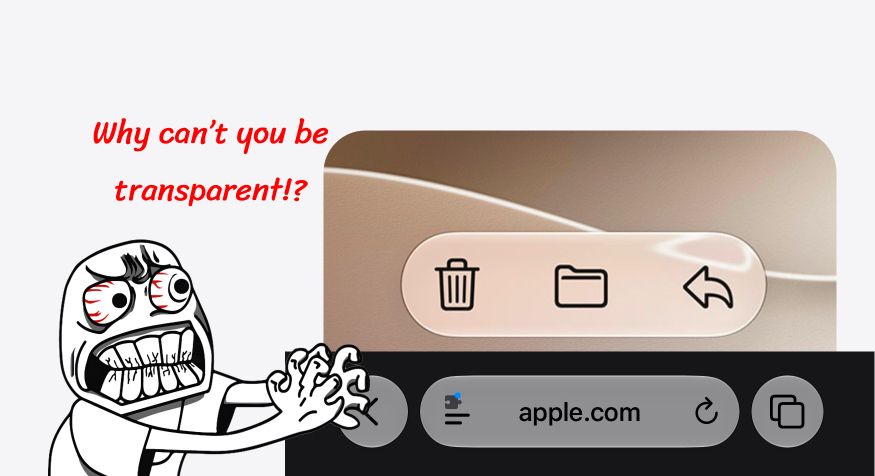
When Apple unveiled Liquid Glass and showed the new floating URL bar for iOS 26, a sense of dread set over me: what is the browser going to do with the space behind the URL bar? So many websites rely on the URL bar being an opaque (or nearly opaque) part of the UI, and therefore anchor important elements to the bottom of the screen.
The web is built on many things, but one of them has always been the most important: backwards compatibility. A website launched in 1995 should (and does!) work just the same now as it did back then. It's the reason we have "wrong" defaults for CSS properties like box-sizing, or why we need to explicitly tell the browser our website is responsive. Changing those would break websites that were made before the new behaviors were even invented.
This kind of UI change, while not necessarily changing the rendered result, is worrisome. The browser chrome stops being something surrounding the website, and starts being something on top of it.
While I think that was the wrong decision by Apple, and definitely taken by the design/marketing teams there instead of the Safari one, I gotta hand it to them: the result was actually much better than expected. They tried to make Safari itself as smart as possible and for the majority of the websites I work at, no changes had to be made.
It does have some hiccups, though.
The Issue
One of the ways Safari tries to blend in is by adopting a fully opaque background behind the URL bar whenever it thinks the website has one too. For example, on Apple's own website, whenever you open the hamburger menu, the URL bar stops being transparent and becomes opaque instead:
This works and is much better than the alternative (the URL bar remaining transparent). However, there is a problem...
After you close the menu, the URL bar remains opaque, even after you scroll down.
I've had this exact same issue on some websites, including my personal one. It turns out that Safari constantly watches the pixels at the very bottom of the viewport, and tries identifying if there's a dominant color there. It doesn't have to be full-width necessarily, it only has to be the majority. A menu that slides from the side and takes up 70% of the viewport width is already enough to trigger the opaque background.
What Safari doesn't do, however, is reverse that check: it watches for dominant colors, but doesn't observe that there stopped being one. So it never returns to its default transparent state.
On my website, I had a similar issue where the bar was going opaque unintentionally: on the feed, I have some sticky date headers, and they have a slight gradient background behind them to help them stay legible even when there's something behind them. This gradient is the exact same color as the page background, so it's invisible to the user.
However, whenever this gradient background touches the first few pixels of the URL bar, the entire bar goes opaque, and never goes back to transparent. See how it behaves once the "19 May 2026" heading goes over the URL bar:
This was annoying the heck out of me, and I spent literal hours looking for a solution. Finally, I found a thread on Reddit that gave me hope. And after some tweaking, I got it to work!
The Fix
The fix is, basically, a hack. If Safari is making the wrong decision when turning the bar opaque, let's stop it from doing the wrong decision, then.
To fix it, we're going to add a sticky, transparent bar that sits right on top of the URL bar. By giving it some high z-index, we can make it sit on top of any content in there and that means that Safari will be reading the background info from that transparent bar instead of whatever else it deemed important.
Here's a demo. In it, I made the bar super tall and highlighted it in blue, so you can see what's going on:
The dimensions of the bar on that demo were, of course, a bit exaggerated. On my testing, I found the sweet spot to be giving it a height of 6px, and positioning it 2px below the URL bar level.
The Code
I know you're here for the code, so here it is.
On your HTML, add this extra element after all your content:
<body>
	<!-- everything else -->
	<div class='safari-liquid-glass-toolbar-fixer' aria-hidden='true'></div>

</body>
And the CSS:
/*
Ensures that the iOS 26+ Safari toolbar will remain transparent
regardless of what content is near the bottom of the screen.
Doesn't work when a <dialog> is open, but recovers the transparency
as soon as the <dialog> is closed.
*/
.safari-liquid-glass-toolbar-fixer {
	position: sticky;
	left: 0;
	bottom: -2px;
	width: 100%;
	height: 6px;
	background-color: transparent;
	z-index: 999;
	display: none;

	/* Make it apply only to iOS Safari */
	@supports (-webkit-touch-callout: none) {
		display: block;
	}
}
Wrapping Up
This post had been sitting in my drafts for a while, as it was something I found a fix and then forgot about. But it's an issue I encounter on a lot of sites, still! So it might be worth finally sharing it as a tip that could benefit someone.
Funnily, I hadn't planned to use Apple's own website as an example of the bug happening, I just realized it today while writing the post itself. If it happens on their own website and neither the website's nor Safari's developers bothered to fix it after over a year, does it mean they never noticed it? Is attention to detail really lacking so much over there? 🤨
Anyway, thanks for reading! Hope this was useful to you. And if you're from Apple, I'll gladly take Apple's money for finding a fix for your website!
Did this blog post change your life? Or maybe I made a mistake that ruined your day? You can always send me an email to tell me about it.