I've been using Vivaldi since I wrote about it last year, and been having a good time with it. Since then it's received a few new features but they were mostly refinements on the existing experience, rather than actually new things (which is fine, refinement is exactly what it needs).
Last week's version 7.9 brought the auto-hide feature, so you can hide the tab bar/address bar to have a "full screen" experience, and only show those on hover. That's cool and works well in my experience, but there was something extra on the release notes that flew under my radar because I didn't really understand the point: "Follower" tabs.
What is a follower tab?
It's a weird name, and even after figuring out why it exists, the name still doesn't make a lot of sense to me. Alas, the feature is much better than the name implies.
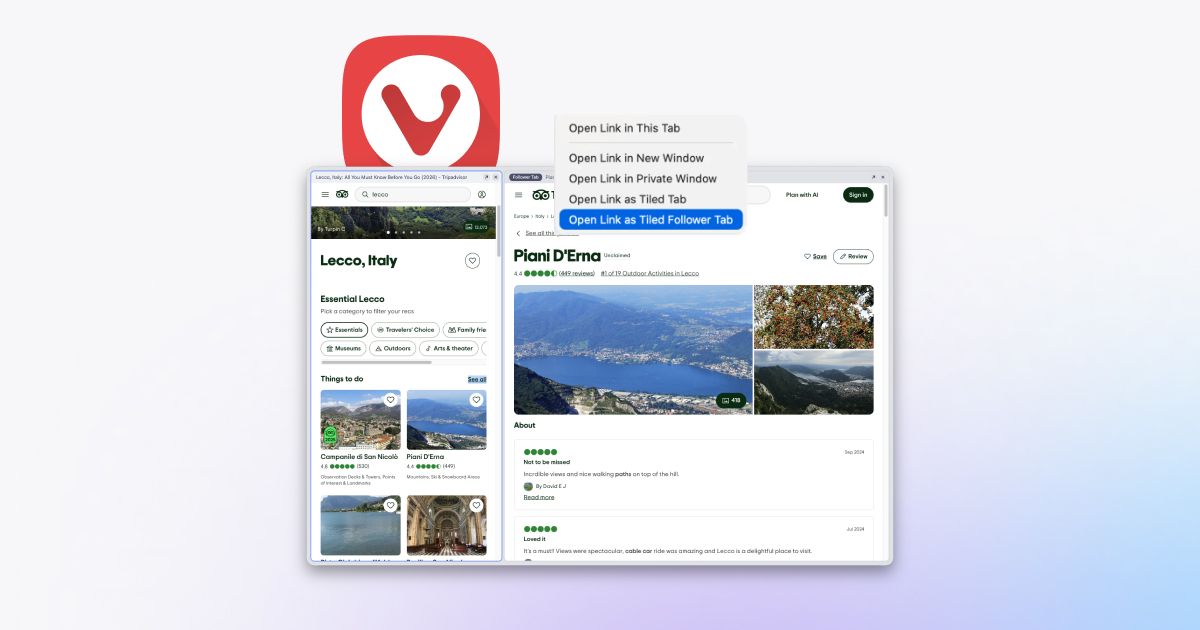
Let's say you find a website that has a lot of Cool Links in it. You wanna click on them all, but you just know that opening 30 tabs means you will never go through them all. It'd be useful if you could check out the links while scrolling the page, and not losing your positional/context awareness. Just like maybe your RSS reader, or any two-pane layout app.
No problem. On that page, right click on a link and open it in a New Tiled Follower Tab. This will open that link in a tile right beside the page you're on. But now, once you want to open another link, you can just click on any other link in the original page, and that will replace the Follower Tab with the link you just clicked! It's just like swapping between links on a RSS reader, or notes in a notes app, or even files in a file manager.
Hopefully the paragraph above made sense to you, but if not, here's a screen recording that will clear things up:

And you can do that anywhere! It fixed one of my biggest gripes with Basecamp, a tool I use on my daily job. It has the very annoying pattern of having everything be a full page, which makes going through a long list of tasks a chore. With Follower Tabs, it's now finally manageable.
It's also great for looking up search results, looking up product pages in an e-commerce, or even hotel listings.

Wrapping up
I called Vivaldi's auto-stacking of new tabs feature "portable rabbit holes" in my first post about it, so I'm trying to think of another name for this one. In a way, it avoids rabbit holes by ensuring you open just one at a time. What would a good name be? Maybe thread keeper, since if keeps your thought thread intact? Doesn't sound as nice.
If you have a good idea, let me know by writing an email or sending a message on Mastodon.
Did this blog post change your life? Or maybe I made a mistake that ruined your day? You can always send me an email to tell me about it.